Let’s cut to the chase: if you’re running a CNC machining center shop (or just got a new one from us), hiring a solid operator is only half the battle. Even the fancier, faster, more accurate machines we supply won’t hit their stride if your team’s fumbling with G-code, panicking when a tool alarm blips, or burning a part because they skipped a quick pre-check. Over the last decade, I’ve sat through more operator training sessions than I can count—some went off without a hitch, others had me hiding a smile when someone tried to jog the X-axis with their coffee mug in their other hand. The good news? Training these folks doesn’t have to be a guessing game. It’s not just about memorizing code or pressing buttons—it’s about building habits that keep parts on spec, machines running, and your wallet happy. Here’s how we do it when we hand off a new CNC machining center to a customer, and how you can adapt it for your team. CNC Machining Center
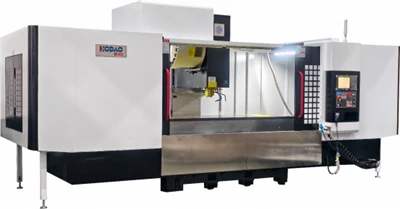
First off, forget the “sit in a classroom for 8 hours and memorize a manual” trap. Most operators learn better by doing, not reading 50 pages of fine print while half-asleep. When we drop off a new machining center at a shop, we don’t start with G-code tutorials. We start with the boring stuff that keeps machines alive for 10+ years: pre-operation checks. I see so many shops skip this, and that’s where 90% of preventable breakdowns come from. Think of this like a car pre-trip before a road trip—you don’t want to find out your tire’s flat when you’re already on the highway. For CNC, that means 10 quick checks: wiping down the way lubrication points, making sure the coolant level’s not too low (or too murky—old coolant causes tool wear like crazy), checking that the tool changer’s grippers aren’t loose, and verifying the emergency stop button works (we always do a test run for that, just to be safe). We walk a new operator through this with the actual machine, not a PDF, and have them do it themselves twice before they even touch a control panel. Why? Because muscle memory sticks way better than a list of bullet points. Last month, a shop we sold a 3-axis vertical machining center to had a new operator skip the coolant check—they burned up a $20 carbide tool in 10 minutes. That operator’s since nailed the pre-check, and that part wouldn’t have happened if we’d let them dive into code first.
Next, let’s talk about the control panel. This is where so many new operators get intimidated. Most modern CNC controls (we use Haas and Okuma on our standard lines, by the way) have a ton of buttons—jog, auto, MDI, G-code editor, alarm history, the works. We don’t sit them down and label every single one. We start with the four buttons they’ll use 90% of the time: jog, auto, MDI, and reset. Jog is for moving the spindle around by hand—we make them practice moving each axis slowly, looking at the readout on the screen, to make sure they know which button moves X left/right, Y forward/back, Z up/down. Then MDI, which is like a tiny test program—they’ll run a simple line, like “G00 X1 Y1 Z1” to move the spindle to a clear spot, before they even touch a full part program. Auto mode is for when the machine’s running the full job, and reset is for when something goes wrong (hint: don’t hammer that reset button unless you know exactly what’s messed up). We do this with a mock part first—no expensive raw material, just a block of aluminum scrap—and have them practice these moves until they can do it in their sleep. No need to teach them about G-code subroutines or circular interpolation until they master the basics. I’ve seen too many new operators try to write complex code on day one, only to crash a tool into the vise because they messed up a Z-height value. Slow and steady wins here.
Once they’ve got the control panel down, it’s time for tooling basics. This is another area where I see so many shops mess up. New operators don’t need to know every single tool holder material or coating—they need to know how to set a tool length offset correctly and how to load a tool without breaking it. We use tool setters on all our machining centers, so we teach operators how to call up the tool setter function, load a tool, hit the “measure” button, and confirm the offset number is saved. We also walk them through common mistakes here: not wiping the tool shank clean before measurement (that adds a few tenths of a millimeter and ruins part tolerance), not seating the tool all the way in the holder, or loading a tool that’s already chipped. Last quarter, a customer told us their operator broke three end mills in a week because they didn’t check tool condition before loading—now we add a 1-minute tool inspection step to every operator’s checklist, and they haven’t broken one since. We also emphasize tool numbering: every tool in the machine has a unique number, and mixing up T03 and T05 is a quick way to run the wrong tool for the job. We have operators practice loading tools into the changer one by one, checking each number against the program, until it’s second nature.
Now, the part that makes or breaks everything: running actual parts. This is where we switch from scrap blocks to real raw material, but we start small. No running a 10-part batch on day one—we start with a single part, simple geometry, like a square with a few holes, so there’s not a million things to mess up. We have the operator pull the program from the control, check that the tool offsets are correct, load the raw material in the vise (teaching them to torque the vise bolts evenly, so the part doesn’t shift mid-cut), and then run it in “single block” mode first. Single block mode means the machine pauses after every line of code, so if the operator makes a mistake, they catch it before it cuts into the material. That’s a game-changer—no more scrapping a whole $50 block of 6061 aluminum because of a typo in the code. We also have them watch the machine like a hawk for the first run: listen to the spindle sound (if it’s growling, that means something’s off), check the coolant spray (it should be hitting the cutting edge, not dripping on the floor), and watch the chip formation. Long, stringy chips mean you need a different tool or feed rate, while small, tight chips mean you’re good. We let them make small mistakes here—like a minor overcut on a corner—on their first real part, so they learn how to fix it before moving to more complex jobs. By the third or fourth part, they’re running the full program on their own, no single block needed, and we’re there to answer questions if something pops up.
Here’s the thing most “training guides” leave out: problem-solving. Even the best-trained operator will run into an alarm at some point—maybe the tool changer got stuck, or the spindle overheated, or the program has a glitch. We don’t just tell them to call us when that happens. We teach them how to check the alarm history on the control, how to decode the error code (every CNC has a code that tells you exactly what’s wrong—most are super straightforward, like “tool not detected” or “axis overtravel”), and how to fix small issues without waiting for us. For example, if the coolant filter’s clogged, we show them how to swap it in 2 minutes, not wait for a service tech. If a tool won’t seat in the gripper, we teach them to check for shavings stuck in the gripper jaws. We also give them a troubleshooting cheat sheet to keep by the machine—simple bullet points for the most common issues, so they don’t have to dig through the manual when an alarm blinks at 7 a.m. on a Monday. This cuts downtime by so much—we’ve had customers who went from waiting 4 hours for a service call to fixing 90% of small issues in 5 minutes.
Wait, what about ongoing training? I can’t stress this enough—training isn’t a one-and-done thing when you pick up the machine. A lot of shops think “we trained them last month, they should know it all.” But new codes, new tooling, new machine updates (we push free firmware updates for all our machining centers every quarter) mean operators need regular refreshers. We do quarterly 2-hour “lunch and learn” sessions with our customers, where we go over new features, common mistakes we’ve seen from other shops, and any new programs that are making parts faster. We also encourage operators to shadow each other—an experienced operator who knows how to set up a 5-axis part can teach a new one in a way no manual can. Last year, a shop in Detroit had two new operators train together, and by letting them practice on each other’s machines, they cut their learning time in half. We also offer on-site advanced training for shops that take on more complex jobs—like 5-axis machining or high-speed milling—so operators don’t get stuck when they move beyond simple 3-axis parts.
Let’s be real: mistakes will happen. Even with the best training, an operator will burn a tool, scrap a part, or hit a code wrong. That’s not a failure—that’s part of learning. What matters is how you handle it. We always tell customers to not yell at the operator when a mistake happens—have them walk through what went wrong, fix it, and make a checklist to avoid it next time. That’s how you build a team that cares about getting it right, not just hitting quotas. I’ve seen shops turn a new operator who scrapped two parts into their top performer in 6 months, just by approaching training like teaching someone a craft, not checking a box.
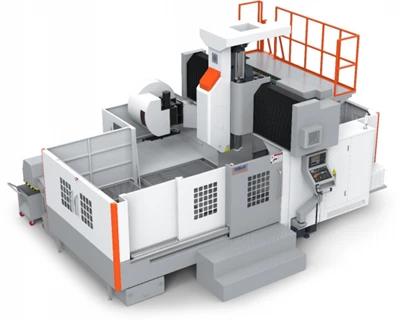
If you’re in the market for a new CNC machining center, or need to refresh your team’s skills on your existing one, let’s talk. We’ve trained hundreds of operators across all kinds of shops—small job shops, large production facilities, everything in between—and we tailor our training to your team’s experience level. No boring lectures, no generic materials, just hands-on, practical training that gets your team running good parts fast. Whether you’re looking to buy a new machine or just want to upskill your current operators, reach out and we’ll walk you through our training programs, answer any questions, and help you get the most out of your CNC machining center. Don’t let a lack of training hold you back from the full potential of your machine—let’s make sure your team is as good as the equipment you invest in.
Horizontal Machining Center References
- “CNC Operator Training Best Practices,” Manufacturing Engineering, 2022.
- Haas Automation CNC Operator Handbook, 2023.
- “Reducing CNC Machine Downtime Through Operator Training,” Modern Machine Shop, 2021.
- Okuma Industrial Training Program Guide, 2022.
Taizhou Qiyang Trading Co., Ltd.
As one of the most professional CNC machining center manufacturers and suppliers in China, we’re featured by quality products and good price. Please rest assured to buy bulk CNC machining center for sale here and get quotation from our factory. Customized orders are welcome.
Address: Zhenhai Village, Binhai Town, Wenling City, Taizhou City, Zhejiang Province
E-mail: qycncmachine@outlook.com
WebSite: https://www.qycncmachine.com/
